I shaped the visual fidelity and structure of an eight-scene demo connecting CRM, collaboration, and AI.
Contribution
Visual fidelity & structure
Timeline
Approximately 1–1.5 weeks
Format
Click-through & demo video
Audience
Customer's internal teams
Customer response: The requesting customer praised how clearly the demo communicated the real workflow.
An anonymized storytelling demo, not a released feature. Full prototype withheld for confidentiality; the selected screen uses fictional presentation data.
123
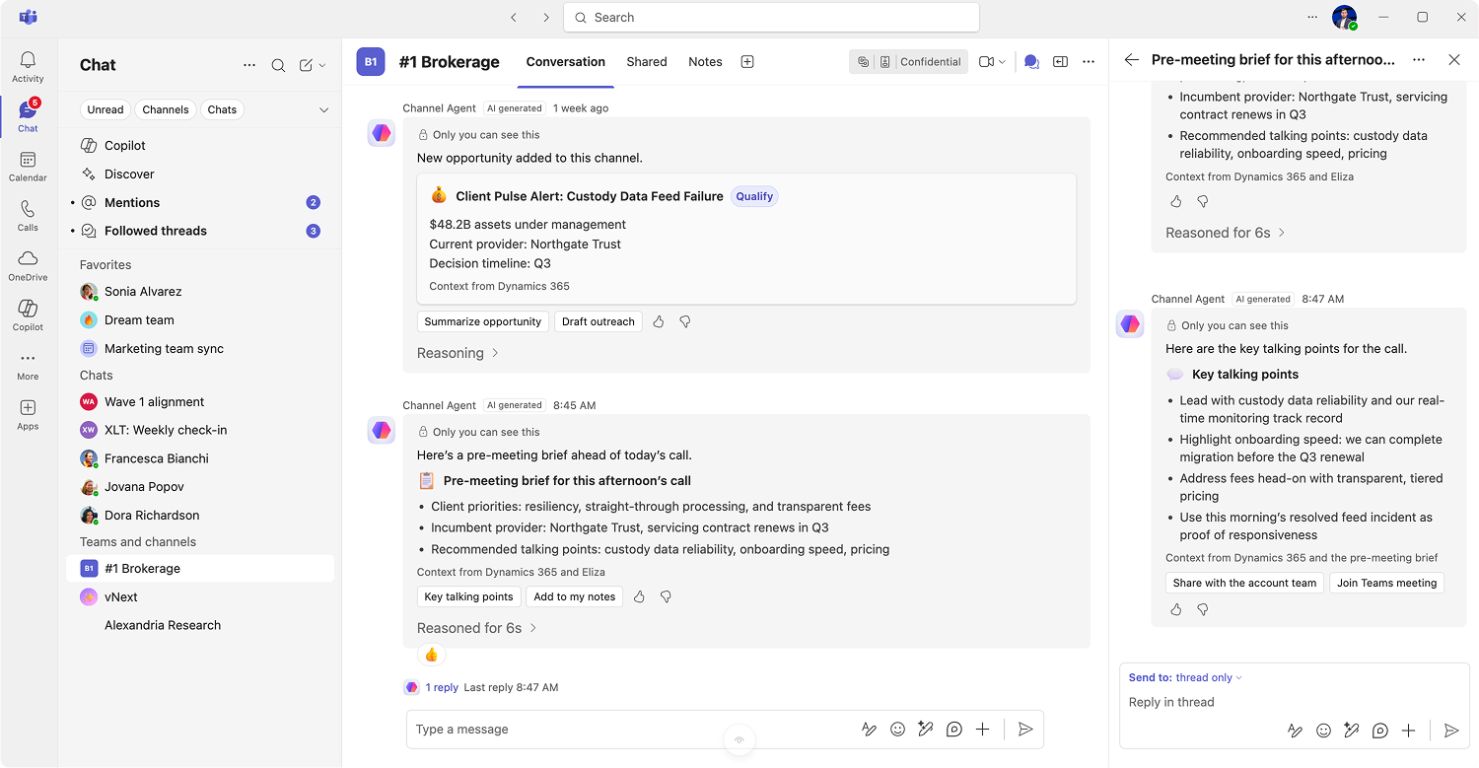
CRM-sourced context. Opportunity details appear in the channel, illustrating how business context could enter the collaboration workspace.
Meeting preparation. A pre-meeting brief brings client priorities and suggested talking points into the same view.
Threaded follow-up. The right-side thread develops the talking points alongside the channel conversation.
Selected concept screen with fictional data, not the complete CRM experience.
01
The context
An enterprise customer reconsidering its collaboration and CRM tools wanted to make a connected workflow tangible for its internal teams at a leadership event. The brief was a storytelling demo: bring collaboration, sales and service workflows, and an internally built agent together in one experience.
We had approximately 1–1.5 weeks to create a click-through for a demo video, with one script connecting multiple products and personas.
02
My contribution
I drove visual fidelity and structure. When reviews flagged differences in spacing, headers, icons, and threaded conversations, my focus was bringing the screens closer to familiar product patterns while keeping the multi-product story coherent.
I drew on the platform team's UI guidance rather than inventing a separate visual language. Another designer focused on interaction design, timing, voice-overs, and micro-interactions.
03
The problem
Sellers lacked a single place to use their organization's AI tools, and CRM access sat outside the collaboration workspace. The customer also wanted threaded channels and chats. Our challenge was to show how these disconnected pieces could form a familiar, connected way of working.
04
The demo story
The eight-scene story followed an opportunity from its appearance in a channel through meeting preparation and a client call, ending with the CRM updating itself.
Before / Starting workflow
CRM outside the workspace
Information and workflows were separated across applications.
After / Demo concept
CRM within the workspace
The demo proposed CRM access alongside collaboration, connecting customer context with preparation and follow-through.
The connected state was explored in the demo, not released as a feature.
05
Designing within constraints
Complexity: six products and agents, multiple personas, and one narrative to follow.
Authenticity: experienced users needed to recognize the product, not just understand the story.
Time: multiple feedback rounds a day, coordinated across product teams, customer stakeholders, and time zones.
06
The pivot
Initial issue
The first prototype lacked authenticity
The story was present, but product experts spotted unfamiliar spacing, headers, icons, and conversation patterns.
Pivot in approach
Ground the demo in the real product
We changed our approach: partner with the platform design team, use its repositories and UI guidance, and reuse established patterns. Detailed reviews, down to border radius, became part of the process.
Observed improvement
Reviewers noticed the difference
Reviewers familiar with earlier versions commented on the progress and increased authenticity.
A full rebuild was considered. With team support, we instead iterated on the existing prototype, incorporating customer terminology and workflow requests without losing the script. This was a pivot in approach, not a restart.
Believability also depended on behavior: loading states, a join sound, and a pause before the meeting complemented the visual work.
07
Outcome & takeaways
The requesting customer's representative thanked the team for bringing the workflow to life. They also highlighted the escalation-support portion and expected it to resonate with stakeholders.
Direct customer feedback
“you've been able to articulate the real flow of work / journey in just a few clicks”